13 August, 2018
Book writing
I am currently in the process of writing a book, called Programming Design
Systems, which is the result of my last five years of teaching. It is a free
digital book that teaches a practical introduction to the new foundations of
graphic design, and it is
available for free online. I hope that
you will subscribe to the newsletter to follow along as I continue to post new
chapters.
15 February, 2015
On meta-design and algorithmic design systems
This post is about something I see as a continuing trend in the design world:
the rise of the meta-designer and algorithmic design systems.
"Meta-design is much more difficult than design; it’s easier to draw something
than to explain how to draw it" - Donald Knuth, The Metafont Book
Until recently, the term Graphic Designer was used to describe artists firmly
rooted in the fine arts. Aspiring design students graduated with MFA degrees,
and their curriculums were based on traditions taught by painting, sculpture and
architecture. Paul Rand once famously said: "It's important to use your hands.
This is what distinguishes you from a cow or a computer operator". At best,
this teaches the designer not to be dictated by their given tool. At worst, the
designer is institutionalized to think of themselves as ideators: the direct
opposite to a technical person.
This has obviously changed with the advent of computers (and the field of web
design in particular), but not to the degree that one would expect. Despite
recent efforts in defining digital-first design vocabularies, like
Google's Material Design,
the legacy of the printed page is still omnipresent. Even the most adept
companies are organized around principles inherited from desktop publishing,
and, when the lines are drawn, we still have separate design and engineering
departments. Products start as static layouts in the former and become dynamic
implementations in the latter. Designers use tools modeled after manual
processes that came way before the computer while engineers work in purely
text-based environments. I believe this approach to design will change in a
fundamental way and, like Donald Knuth, I'll call this the transition from
design to meta-design.
So what is meta-design? In a traditional design practice, the designer works
directly on a design product. Be it a logo, website, or a set of posters, the
designer is the instrument to produce the final artifact. A meta-designer works
to distill this instrumentation into a design system, often written in software,
that can create the final artifact. Instead of drawing it manually, she is
programming the system to draw it. These systems can then be used within
different contexts to generate a range of design products without much effort.
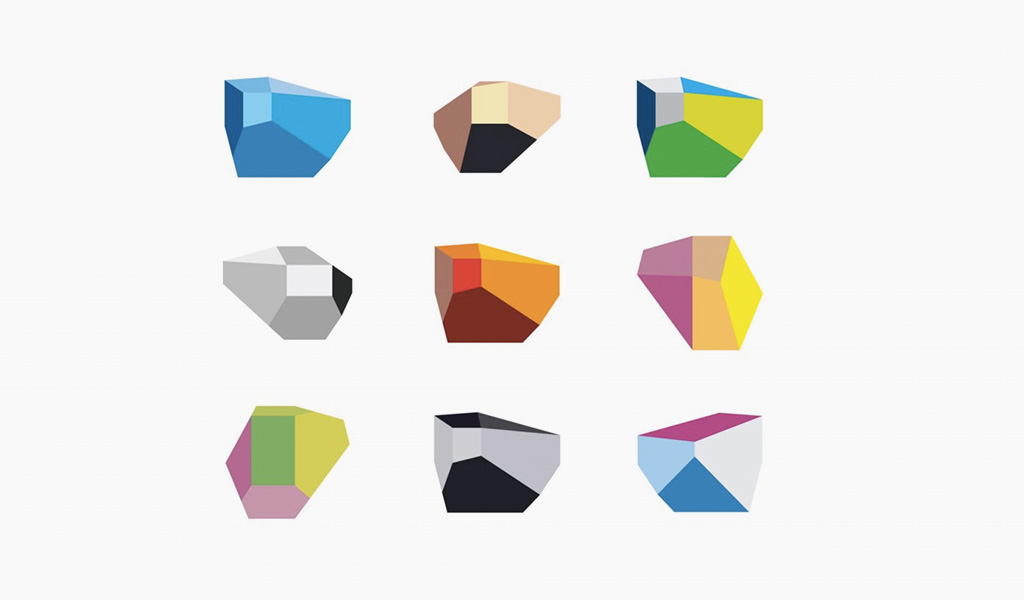
As a simple example, take this logo for a concert hall in Portugal. Instead of
designing a static logo, Sagmeister & Walsh
delivered a logo system that can be used to
generate endless variations
of the logo, for use in posters, business cards, and on the web. Another example
is Donald Knuth's Metafont, a
programming language for designing typefaces. Where normal fonts are defined by
their vector outlines and require tedious manual work to create, Metafont
algorithmically generates new fonts via strokes inspired by human handwriting.
Although not a new phenomenon, I believe this to be an important evolution of
the design profession, and there's a number of reasons why I think it's
particularly interesting today.
-
1
Design products are becoming increasingly dynamic, which makes it difficult to sustain a design process based on static prototypes. Design is how it works and sketching in code is the only natural way to prototype a dynamic system. Building even the simplest of data visualizations means hours of work in languages like R, Julia or Python. When your content is data, poking around in Photoshop simply makes no sense. In some way, it's the direct opposite of design: prettifying without context. One important aspect of modern design products is their increasing demand for temporal logic, where a linear narrative is replaced by a set of complex states. Many apps and games need to dynamically transition between hundreds of states, and static design tools fail completely in prototyping these kinds of products. Another example is the use of procedural elements in games, where it's simply impossible to design everything by hand. Visual thinking is increasingly done in code, and there isn't much to do if you can't program. As our design products become dynamic it makes less and less sense to separate the design and implementation.
-
2
A new generation of designers is starting to occupy important design positions in the U.S and abroad. For these designers, programming is a natural tool for creating the design products they desire, and their creative process is often built on a very systematic approach to design. They are as visually talented as they are technically proficient and they see the technical process as an accelerator for creativity, as well as a way to liberate themselves from the manual techniques enforced upon them from traditional design software. Therefore, they often struggle to work in environments that enforce a traditional division of labor.
-
3
An expanding set of algorithmic design tools now provide a better level of entry for many aspiring designers who wouldn't ordinarily think of themselves as programmers. Even though there are surprisingly few interfaces for algorithmic design tools (an argument fit for a blog post in itself), there are now hundreds of libraries and frameworks for creating designs in code. We're also seeing a proliferation of educational material aimed at visual thinkers. Recent publications for just a single one of these projects, Processing, include books, videos, websites, and interactive learning environments, most of them freely accessible on the internet.
-
4
Systems are an important part of our design history. I find this point extremely important, as it's something I realized rather late in my design education. The history of graphic design is full of artists using rules or systems. Before the computer was a household item, Karl Gerstner wrote the book "Designing Programmes", outlining many of these exact ideas. Algorists like Sol Lewitt also valued the algorithm over the artifact. It's important for designers to learn how to express themselves using systems, simply because history shows that systems can be expressive, creative, and challenge many of the notions inherited from traditional design labor. Furthermore, today these theories can be more than theoretical instructions for a manual workflow. We have the ability to write algorithmic systems that create designs, and the designer of the future will need to understand how to deliver on that promise.

It's dangerous to speculate about the future if you're looking for simple
outcomes, and we know for a fact that the new doesn't extinguish the old.
However, I think a new type of meta-design practice will become increasingly
visible, and I'd like to describe what this could look like.
I envision a design practice that works in the intersection between art, design
and computation. A company founded on the belief that the pragmatic and poetic
is inseparable, and that modern design products should be dynamic, adaptable
systems built in code. This kind of practice would create beautiful,
intelligent, and functional design products for any medium, be it physical
installations, web applications, or print products. Most of all, it would be a
company dedicated to good ideas, with the talent to implement them despite
technical requirements.
There are several reasons why this practice would be built around designers who
work in code. They have the skills to question assumptions brought to us by
existing design tools, and can help build new tools to replace them. They can
think critically about these trends using their domain-knowledge, and conduct
original research with deep connections between the humanities and computer
science. They can also build a company culture where this talent wants to work,
with
a deep trust in the individual,
a relentless pursuit of the sublime, and a belief in failure as a means of
innovation.
Some design studios are exploring similar
themes in their work, and academic institutions are releasing
publications
focused on dynamic design. It has been a popular topic in independent
design magazines
too. Using the word programmer is quickly becoming as exhausted as the term
computer operator, and we will need to grapple with the fact that developers
are becoming a creative class – particularly in the design world.
Thanks to Greg Borenstein for providing valuable feedback on an earlier draft of this post.
26 November, 2014
OK Go – a Golang template for Ruby on Rails developers
I have been interested in Go for a while. The benefits are obvious: It’s crazy
fast, optimized for concurrency, and the standalone binaries are wonderful for
deployments. My Rails app takes about 18 seconds just to come to life, so the
speed alone is a huge win for me.
However, getting started with Go is not easy. Say what you want about Ruby on
Rails, but it’s hard to find a framework that makes is so easy to get started.
Moving to Go feels a bit like coding a new application in Rack: The libraries
are there, but you have to integrate everything by yourself. Being closer to the
metal is incredible, but ease of use is important too. The popularity of
frameworks like Martini is a testament to that.
To contribute a little bit, I’ve been working on a template for Go applications,
inspired by some of the concepts from Rails. It has folders for models, views
and controllers (models, templates and routes in Go speak). It ships with sane
defaults for databases. It has an asset pipeline. It has route and model tests.
It just works on Heroku.
It is my hope that this template can serve as reference for developers starting
out with Go. It might very well be that you will end up using only a few things
from the template, but I think it's beneficial to demonstrate all of these
concepts in the same application code.
The code itself is heavily commented, and all folders have a README file for
clarification. Pull requests are more than welcome, and so is questions and
comments on Twitter (@runemadsen).
You can find the GitHub repository here:
OK-GO on GitHub
16 November, 2014
Calculating Your PERM Audit Reply Date
Like many other foreigners in the US, I've been stuck in the greencard
application process since early 2013. The frustrations over that process and its
toll on my family is a story for another time. Long story short, our greencard
application was randomly audited, and we've now been stuck waiting for a reply
for 513 days and counting.
The only info you can find about the PERM audit process is that it will take
9-14 months. This weekend, I wanted to see if I couldn't find a better estimate
for this, and it was very easy.
Using data from the
Trackitt PERM tracker,
I found the last 6 resolved PERM audit cases, and looked at the total processing
time for each audit. The ranges were close (573-584 days) with an average of 578
days. Using my own priority date, it was super easy to throw together a small
Ruby countdown script.
It seems like I have at least 65 days more of waiting, with an estimated reply
date of January 20th 2015. It's very simple stuff, but having a concrete date
feels really good.
11 September, 2014
Graphis Diagrams
Lately I've been writing about data visualization and its connection to our
broader graphic design history. This reminded me of this book, Graphis
Diagrams, first published in 1974. To put things in perspective, this was 7
years before the release of the
Xerox Star computer,
which pretty much defined the way we think of modern day computers and their
interfaces.

When I need to show how data visualization doesn't exist in a vacuum, this is
the book I bring. It's a great testament to how our modern design trends are a
natural evolution of a graphic design expression that has existed for many
decades. There is too many things to say about this book, but this is my general
conclusion: the market for data visualization books is vast and terrible. I own
at least 5 books about data design published after 2005 that I bring to lectures
to show bad practices. The biggest flaw in them seems to be a blind fascination
of the computer as a design tool, and the way to avoid this might be to read a
book where many of the designs were made without a computer.
Browsing the book,
you'll discover work with similarities to many modern design products, and I
often look to this book for inspiration too. The book itself is quite expensive,
but I've found that most university libraries have one in stock.